Frequently Asked Questions - Toggle All
Live Traffic Layer
- Who provides the data for the Live Traffic layer?
- INRIX provides the data. All rights reserved.
- How is Live Traffic congestion displayed?
-
Traffic is displayed as a percentage of free-flow speeds, which is frequently the speed limit or how fast cars tend to travel when unencumbered by other vehicles. The streets are color coded as follows:
- Green (fast): 85 - 100% of free flow speeds
- Yellow (moderate): 65 - 85%
- Orange (slow): 45 - 65%
- Red (stop and go): 0 - 45%
- How is the Live Traffic data collected?
- Data is crowdsourced (aka probe data) from "connected vehicles" or devices such as GPS navigation devices, mobile phones in vehicles, etc. The data source is updated every five minutes, so local traffic conditions may vary compared to what TripCheck is showing.
- Why don't all roads and highways have congestion data shown at all times?
- INRIX can only show data where they have current probe vehicles, or access to agency sensor data like radar or loop detectors. Certain low volume and rural routes may not have enough probe data to calculate free flow data. If data is available, lower volume roads may not "turn on" until you reach zoom levels 7-10.
Travel Time
- How are travel times calculated?
- Hundreds of sensors embedded in the roadway and overhead detect traffic volume and speeds. This information is relayed to ODOT's Traffic Operations Center on a real-time basis. Sophisticated computer technology translates data from the sensors into the Travel Time information displayed on TripCheck.
- Does the location of Travel Time icons on TripCheck match the Travel Time signs at the roadside?
- Many of the travel time routes displayed on TripCheck originate at the roadside VMS locations. With TripCheck, routes can be added or altered to meet the needs of the travelling public without the restraints of physical infrastructure.
New Map
- Why did TripCheck change? I liked it the way it was!
-
There are three main reasons why we decided to update TripCheck:
- We were running out of space to add additional roadside cameras and information on the old TripCheck pages, especially in the Portland metro area. The new TripCheck provides unlimited space to add cameras, automated weather stations, data from local jurisdictions and provides the necessary space for future needs.
- TripCheck is now optimized for different screen sizes; it is not an 'app' but it acts like one with a mobile-ready approach. NOTE: it is illegal for drivers to use a mobile device when driving.
- New map options make it easier to navigate, give you more information - TripCheck is now like most other maps on the Internet, with pan and zoom features, layers you can turn on and off, and other similar options.
- What browsers are supported?
- TripCheck works best on the latest modern browsers. This includes smart phones, tablets and other mobile devices. Modern browsers are faster, safer, more secure, and let you do more. Ipgrade your browser to the latest version today. It's easy.
- What is Waze?
- Waze is a GPS based smart phone app that allows users to report traffic conditions and weather.
- Why is ODOT using Waze data?
- Waze is one of the largest "crowd sourced" traffic applications on the market. Adding Waze data to our authoritative data helps provide real time conditions and supplements information in areas where we don't have devices on the road.
- What is the coverage of Waze data?
- Waze provides us a copy of their data for the entire state of Oregon. Currently Waze data is concentrated primarily in the Portland Metro area (because that is where the "Wazer's" are). As Waze continues to gain new users throughout the state, there is a potential to increase coverage in cities and towns throughout the state.
- How do I add TripCheck to my iPhone Home Screen so it launches like an app?
- iPhone, iPad, & iPod Touch. Launch the Safari browser on Apple's iOS and navigate to the website or web page you want to add to your home screen. Tap the Share button on the browser's toolbar - that's the rectangle with an arrow pointing upward.
- How do I add TripCheck to my Andriod Home Screen so it launches like an app?
- Launch Chrome for Android and open the website or web page you want to pin to your home screen. Tap the menu button and tap Add to homescreen. You'll be able to enter a name for the shortcut and then Chrome will add it to your home screen.
Cameras
- My bookmarked custom camera view doesn’t work.
-
TripCheck has been upgraded to allow for better functionality and easier maintenance. We apologize that this upgrade has change some of the pages web addresses, leading to certain bookmarks not working as they did before the change. If you like your bookmark(s), please feel free to recreate them using this process:
- Go to the Custom Cameras page.
- Select the cameras that you would like to see in your view (max of 10).
- Click on the Preview Cameras button.
- Bookmark the page that comes up in your browser.
- How often do the cameras update?
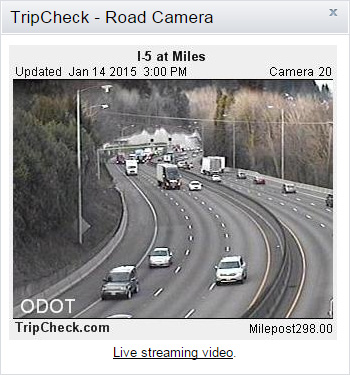
- Most of the cameras update every 5 minutes. Rural camera may take a little longer depending on their network connection. At a minimum, all cameras update several times an hour.
- I would like to see more cameras in a particular area.
- Our network of cameras continues to expand. The TripCheck team continues to work with ODOT staff in various parts of the state to judge priorities for new camera installations. The ability to access phone and power sources, among other constraints, can limit our options for new camera sites. There are also costs for maintenance and operations that are considered. Currently, there are over 300 cameras on TripCheck. Citizens are welcome to send in their camera suggestions to the TripCheck Support mailbox.
- Why don’t you have directional indicators on all cameras?
- The cameras outside the metro areas have a direction indicator located in the right hand corner above the camera image. These cameras are always looking in the same direction. But most cameras in the Metro areas are Pan, Tilt, Zoom and can rotate at a moment's notice. Since they change direction, we can't place the direction above the image as we can with the permanently mounted cameras. Some of the new metro area cameras do have an electronic direction indicator on the screen but most do not. To find the direction indication on Portland cameras that don't, click on the live streaming link below the camera image, there you will see a message stating that "traffic closest to camera is traveling east" (for example).
- So, "live streaming" is now available on TripCheck?
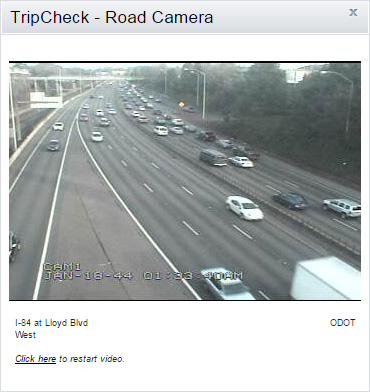
- Live streaming is available but limited to selected cameras in the Portland Metro area. To view this popular feature click on the Live Streaming link below the camera and the streaming image will appear. The streaming is limited to 60 second sessions. You must click on a link below the camera image to restart the streaming for another 60 seconds.
- Why is the live streaming limited to just the Portland Metro area?
- Live streaming is made possible through an agreement with trafficland.com. At this time the infrastructure required to support live streaming is only available in Portland. In the future it's possible that other areas of the state will be considered.
- How does the live streaming work?
- A new camera image is displayed every two seconds which gives an animated effect of live streaming.
- Does ODOT archive camera images?
- ODOT does not save camera images. After an image is shown for its set duration it is then written over by the next camera image. Images are not archived due to the amount of resources it would take to save the thousands of images accumulated daily and to respect privacy concerns.
- What is Last Daylight Image and when is it available?
- TripCheck calculates that last daylight image based on the Sunset time provided the U.S. Naval Observatory and when it reaches that time, the camera image saves this image. We call this saved image the LDI or Last Daylight Image. When a user is clicking on various camera images after the sunset time, they are able to see a link at the bottom, which says "Click here to see the Last Daylight Image". If the user clicks on that link, the Last Daylight Image and the Current Image appear. LDI images are available for 4 hours after they are captured. Once the LDI image expires, the "View Last Daylight Image" link will automatically be removed.
- Why do only some of the cameras show the current temperature and wind speeds?
- Cameras that display the current temperature and wind speed have a weather station close by to collect and feed the data. Because of the cost of these weather stations, ODOT can't justify placing a weather station at every location. Instead, we opt to spread the coverage out geographically.
- Are TripCheck camera images and current road condition data available for private use?
- The Oregon Department of Transportation allows businesses, private citizens and organizations to use data and images found on TripCheck. To begin collecting real time data users can sign up for a TripCheck Travel Information Portal (TTIP) account. This information is formatted in Extensible Markup Language (XML) and it's suggested that users know XML as a prerequisite before signing up for a TTIP account. Sign up for a TTIP Account.
- Is there an easy way to get a camera's URL?
- To get the address of any camera right click on the camera image. A menu will appear, scroll down and click on "Properties". The address or URL can be found and copied under "Properties". ODOT should be credited for use of the camera. Language such as "Camera courtesy of ODOT" is acceptable.
Road Conditions
- How is the winter road condition information obtained and how often is it updated?
-
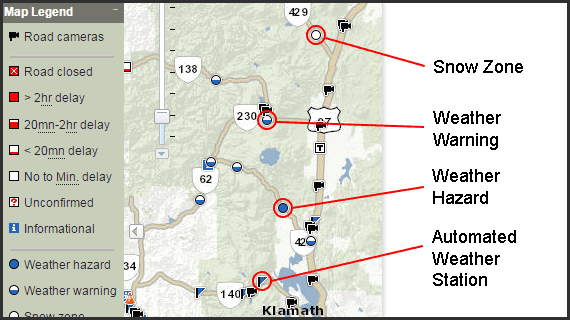
During winter months, ODOT maintenance crews provide Road/Weather reports for our mandatory road reporting stations. These stations are located in areas that typically get the worst weather. The reports are displayed on TripCheck road conditions maps as Severe Weather Hazards (full blue circles) or Weather Warnings (half blue circles).
Crews provide these reports five times per day and at other times when conditions change significantly. The daily reporting times are approximately 4:00 AM, 7:00 AM, 10:00 AM, 3:30 PM, and 8:30 PM. Actual reporting times can vary depending on crew availability.
During major winter storms, personnel can be busy responding to incidents or clearing snow on certain highway segments which can cause delays in our reporting of conditions. Reporting may not occur during periods of good weather when crews are not on duty during some shifts. Road condition reports for non-mandatory reporting stations are reported only when conditions warrant.
- What are snow zones?
- Designated by a white circle with a blue outline, snow zones represent a stretch of highway where you must carry tire chains or traction devices regardless of the road conditions. The snow zones are in effect during the winter driving season which begins in November or sooner if there is an early snow. The snow zones end in May but in some areas may continue into June if there is a late winter driving season. The snow zones will be taken off the TripCheck map when they are canceled for the season.
- Do you report on all roads found on the TripCheck map?
- No, these roads are displayed for reference only. ODOT does not report conditions for these roads. National Park roads, Scenic Byway roads, USDA Forest Service roads and County roads are not reported on and you should always make local inquiries for specific road and travel conditions, especially in remote areas. Some roads are impassable following severe weather conditions.
- What is the "Alert" feature?
- Travel and traffic conditions that have a major impact on motorists are displayed as "Alerts". Road Closures, delays over 2 hours, major NOAA (National Oceanic and Atmosphere Administration) alerts, and hazardous weather (both regional and statewide) are examples. You may also see Amber Alerts.
- What are "Announcements"?
- Announcements are related to TripCheck itself. If we add a new feature, have a service interruption, or make changes that impact users we will share that information as an Announcement.
- Why do you have such broad categories for delay information such as "greater than 2 hours"?
- It is very difficult to anticipate the precise time delay that any incident may cause considering the nature of the incident and potential injury to motorists. Serious incidents may require on scene investigations or the intervention of a HAZMAT unit which can extend the delay considerably.
- We try to indicate a general factor for a delay that helps motorist make good decisions about taking an alternate route, delaying their travel, or taking another mode of travel. We make a very concerted effort to update our information as conditions change or we have better information to share.
- I've seen temperature differences between the blue circle (or semi-circle) and the blue weather flags?
- The blue weather flags are automated weather stations that automatically take a weather reading every few minutes.
- The blue circle or semi-circle are live reports from ODOT crew members who have relayed the current road and weather conditions. These road and weather reports cover a particular stretch of highway, rather than a single predesignated location. Crews provide reports (blue circles or semi-circles) five times per day and at other times when conditions change significantly.
- Does ODOT have advice on what items should be carried in your car for winter or general travel?
- ODOT has published a notice on general winter driving with a number of helpful topics.
Local Traffic Information
- Is there anywhere on TripCheck I can find local traffic?
-
Local municipalities have the capability to post local traffic information on TripCheck. If there is a local incident posted on TripCheck you will find
a local road condition icon
 on the incident map in the region where it occured. Not all Oregon municipalities have committed to posting local information.
Archived Road Condition and Incident Data
- How do I get an archived road condition or incident report?
- Archived road condition reports for a particular State or US highway are available by request. These reports are available 24 hours after the date requested. In most cases, a simple road report can be turned around in one to two working days. To request an archived road report: TripCheck.Support@odot.state.or.us
Technical Issues
- My browser is outdated or in Compatibility View, how do I fix it?
- The best option is to update your browser. New browsers are faster, safer and more secure. Learn more at Browse Happy.
If you have Microsoft Internet Explorer 9 in Compatibility View mode try to find and click the blue broken page icon in your address bar.
Or, in your browser click the Tools menu and find Compatibility View on the menu. Make sure it is unchecked. Additionally, you can click Compatibility View Settings and ensure TripCheck.com is not on your list of "Websites you've added to Compatibility View". - My browser is not showing me up-to-date images. What do I do?
- What's probably happened is that your computer is showing old "cached" images rather than the latest images from our cameras. We have seen a trend in people experiencing these browser related problems. Fortunately, there is an easy remedy to the problem. First, simply try refreshing your browser by pressing F5 on your keyboard or the refresh symbol on your browser. Your other option is to empty the cache. How you do that will depend on the browser you are using. If you continue to have problems, please email us at ODOT TripCheck Support.
TripCheck Mobile and 511
- Does ODOT offer a mobile web app or native phone app?
- No. The TripCheck Mobile (Low Bandwidth) web app has been retired. TripCheck is mobile-friendly and works on modern smart phones free of charge. Some private developers have created such "Apps" but they are not affiliated with TripCheck or the Oregon Department of Transportation.
- Do 511 get the same road conditions and incident information as TripCheck?
- Yes. As soon as an incident is reported to our dispatching center, the incident is entered into a data base and the information is distributed to TripCheck and 511 at the same time.
- What do I do if there is loud background noise that interferes with my commands?
- Because 511 listens for your voice command, background noise can interrupt voice commands. After the third interruption, the user is automatically switched to the key pad only function.
- Are 511 initially limited to just Voice Commands?
- You can use your key pad at anytime to execute commands.
Commonly Used Definitions Found on TripCheck
- 50 F
- 50 degrees Fahrenheit
- AP
- Airport
- Avg.
- Average
- CTOC
- Central Transportation Operations Center (Region 4 and 5)
- EB
- East Bound (traffic flow)
- GVW
- Gross Vehicle Weight
- In
- Inch
- MP
- Mile Post
- MPH
- Miles Per Hour
- NB
- North Bound (traffic flow)
- NOAA
- National Oceanic and Atmosphere Administration
- NWTOC
- Northwest Transportation Operations Center (Region 2)
- ORE
- Oregon State Highway
- PM
- Afternoon/Evening
- Rel.
- Relative Humidity
- SB
- South Bound (traffic flow)
- STOC
- Southern Transportation Operations Center (Region 3)
- TMOC
- Portland Transportation Operations Center (Region 1)
- US20
- Federal Highway 20
- WB
- West Bound (traffic flow)